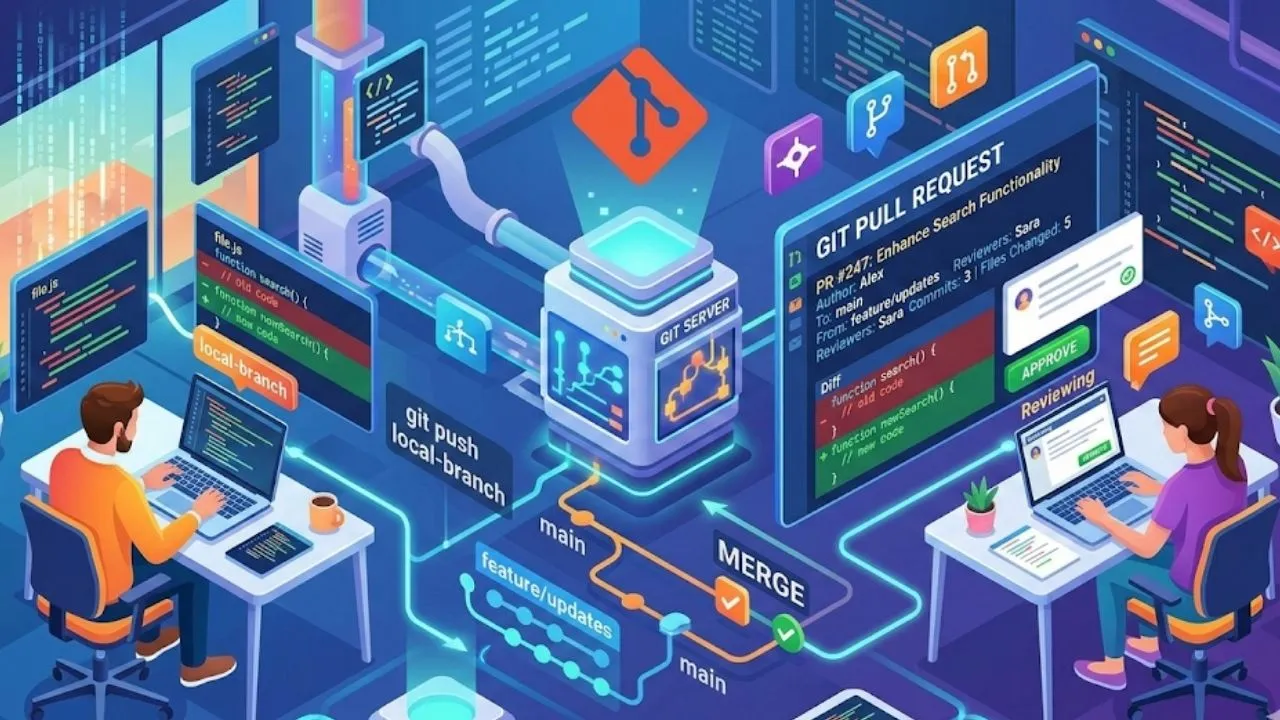
What Is a Git Pull Request? A Practical Guide for Faster Code Reviews
Introduction
You can write great code and still break production if integration is rushed. That is exactly why teams rely on pull requests. A pull request (PR) is not just a merge step — it is the checkpoint where quality, context, and collaboration come together.
If you are new to GitHub workflows or trying to speed up reviews in your team, this guide walks through the practical side: what a pull request is, how to open one properly, how to review effectively, and how to avoid the PR mistakes that waste days.
Table of Contents
- What Is a Pull Request?
- The Pull Request Lifecycle
- Creating a Pull Request Step by Step
- Writing an Effective PR Description
- Using PR Templates
- Code Review Best Practices
- Keeping a PR Clean and Up to Date
- Automating PRs with CI/CD
- Common PR Anti-Patterns
- PR Strategies: Draft, Stacked, and Pair PRs
- Conclusion
What Is a Pull Request?
A pull request is a request to merge changes from your branch into a target branch, usually main or develop.
Simple example: you build a login feature in feature/login, then open a PR into main. Before merge, teammates review logic, tests, and side effects.
The term “pull request” comes from the idea of requesting that the repository maintainer pull your changes in. On GitHub and Bitbucket it’s called a pull request (PR); on GitLab it is called a merge request (MR) — but they refer to the same concept.
A PR is not just a diff
Many developers think PRs are only a visual diff. In reality, a pull request creates a shared workspace where:
- Code changes are visible and reviewable line by line
- Comments, discussions, and suggestions are tracked over time
- Automated checks (tests, linters, security scans) run and report results
- Decisions about why code was accepted or rejected are documented clearly
- Approvals from relevant team members are formally recorded
That mix of visibility, discussion, and automation is why PRs are central to modern development workflows.
Pull Requests vs. Direct Commits
| Aspect | Direct Commits to Main | Pull Requests |
|---|---|---|
| Code review | None | Structured review before merge |
| Bug detection | After the fact | Before code lands |
| Knowledge sharing | Minimal | Built into the review process |
| Rollback complexity | Higher (mixed commits) | Easier (atomic feature branches) |
| Audit trail | Git log only | Full discussion + approval history |
The Pull Request Lifecycle
Understanding the full PR lifecycle helps you see how individual steps connect.
┌─────────────┐     ┌──────────────┐     ┌─────────────┐
│  Branch     │     │   Open PR    │     │  CI Checks  │
│  Created    │────▶│  (Describe,  │────▶│  Running    │
│             │     │   assign)    │     │             │
└─────────────┘     └──────────────┘     └──────┬──────┘
                                                 │
                    ┌──────────────┐             ▼
                    │    Merge /   │     ┌─────────────────┐
                    │    Close     │◀────│  Review &       │
                    │             │     │  Iterate        │
└─────────────┘ └─────────────────┘- Create a feature branch — isolate your change from the main branch
- Commit and push — build your feature with focused commits
- Open a pull request — provide context, reference issues, assign reviewers
- CI/CD runs — automated tests, lint, coverage, security checks execute
- Review & iterate — reviewers comment, author addresses feedback
- Approval — required reviewers approve the changes
- Merge — code is incorporated into the target branch
- Branch cleanup — feature branch is deleted to keep the repository tidy
Creating a Pull Request Step by Step
1. Start with a Well-Named Branch
Branch naming conventions make it immediately clear what a PR is about:
# Feature branches
git checkout -b feature/add-user-authentication

# Bug fix branches
git checkout -b fix/resolve-login-redirect

# Refactoring branches
git checkout -b refactor/extract-payment-service

# Hotfix branches
git checkout -b hotfix/patch-xss-vulnerability
A consistent naming scheme also enables automated PR labels and routing rules.
2. Make Focused, Atomic Commits
Each commit should represent one logical change. This makes the review history easier to follow and simplifies rollbacks if needed:
# Bad: all changes in one commit
git commit -m "changes"

# Good: focused commits with context
git commit -m "feat(auth): add JWT token validation middleware"
git commit -m "test(auth): add unit tests for JWT validation"
git commit -m "docs(auth): update API docs for protected routes"
Following Conventional Commits (feat, fix, docs, refactor, test, chore) provides structure and enables automatic changelog generation.
3. Push Your Branch
git push origin feature/add-user-authenticationOn subsequent pushes after a force-rebase or amend:
git push --force-with-lease origin feature/add-user-authenticationUse --force-with-lease instead of --force — it will refuse to overwrite if someone else has pushed to the branch since your last fetch.
4. Open the Pull Request
On GitHub, navigate to the repository and click “Compare & pull request” or go directly to https://github.com/owner/repo/compare/main...feature/add-user-authentication.
Fill in:
- Title: Short, imperative summary of the change
- Description: Detailed explanation (more on this below)
- Reviewers: Assign the people who need to approve
- Labels: Categorize the PR (
enhancement,bug,breaking-change) - Milestone / Project: Link to a sprint or project board if applicable
- Linked Issues: Use keywords like
Closes #42to auto-close issues on merge
Writing an Effective PR Description
Your description can make review either smooth or painful. A strong PR description removes guesswork before the reviewer reads any code.
The WHAT-WHY-HOW Framework
## What does this PR do?
Adds JWT-based authentication middleware to protect API endpoints.
Previously, all API routes were publicly accessible.

## Why is this change needed?
Part of the security hardening initiative (see ticket #AUTH-102).
Anonymous access to user data endpoints was identified as a critical
vulnerability in the last security audit.

## How was this implemented?
- Added `validateJWT` middleware using the `jsonwebtoken` library
- Applied the middleware to all `/api/v1/users/*` routes
- Extended the User model with `lastLoginAt` timestamp
- Token expiry is set to 15 minutes with refresh token support

## Testing
- [ ] Unit tests pass (`npm test`)
- [ ] Integration tests updated
- [ ] Manually tested with Postman (collection exported in `/docs`)

## Screenshots / demos (if relevant)
[Attach screenshots here]

## Notes for reviewers
The token refresh logic in `src/auth/refresh.ts` is the trickiest part —
please pay extra attention to the race condition handling on line 84.
With this structure, reviewers can skim quickly and jump straight to the risky parts.
Using PR Templates
Rather than relying on every developer to remember to write good descriptions, encode your team’s expectations into a PR template. GitHub, GitLab, and Bitbucket all support them.
Create .github/PULL_REQUEST_TEMPLATE.md in your repository:
## Summary
<!-- What problem does this PR solve? Link to related issues. -->

## Changes
<!-- List the key changes made in this PR -->
-
-

## Type of change
- [ ] Bug fix (non-breaking change)
- [ ] New feature (non-breaking change)
- [ ] Breaking change (changes existing functionality)
- [ ] Documentation update

## Testing performed
- [ ] Unit tests added/updated
- [ ] Integration tests added/updated
- [ ] Manual testing completed

## Checklist
- [ ] Code follows project style guidelines
- [ ] Self-review completed
- [ ] No debug/console logs left in code
- [ ] Documentation updated if needed
- [ ] No new security vulnerabilities introduced
For multi-template support (e.g., different templates for features vs. bug fixes), create a directory:
.github/
  PULL_REQUEST_TEMPLATE/
    feature.md
    bug_fix.md
    hotfix.md
Code Review Best Practices
Code review is a collaboration skill, not a fault-finding contest. Done right, it raises quality without creating team friction.
For Reviewers
Review the description first. Before reading a single line of code, understand what and why. Context dramatically changes how you interpret code.
Use review categories in comments. Not every comment requires action. Signal your intent:
// nit: minor style preference, feel free to ignore
// suggestion: might be cleaner, but not blocking
// question: I don't understand this — can you explain?
// blocking: this must be addressed before merge
// praise: great approach here!
Focus on the right things. Prioritize:
- Business logic correctness
- Security vulnerabilities
- Performance implications
- Maintainability and readability
- Test coverage
Leave style debates to linters and formatters. If indentation keeps appearing in review comments, that is usually a tooling gap.
Suggest, don’t dictate. Prefer:
“Have you considered using
Array.prototype.reducehere? It might be more readable because…”
Over:
“You must use reduce here.”
Timebox your review. If a PR is too large for one focused session, ask the author to split it.
For Authors
Review your own PR first. Before requesting reviews, go through the diff yourself. You’ll catch obvious issues and save your reviewers’ time.
Respond to every comment. Even if you don’t make the change, acknowledge it with a brief explanation. This closes the feedback loop and builds trust.
Do not take comments personally. Review is about the code, not the person.
Resolve comments, don’t just mark them done. When you address a comment, add a reply explaining what you changed or why you didn’t. This creates a useful audit trail.
Keeping a PR Clean and Up to Date
Syncing with the Base Branch
As the base branch (e.g., main) moves forward, your feature branch can fall behind and create merge conflicts. Stay current:
# Option 1: Merge the base branch into your feature branch
git checkout feature/add-user-authentication
git fetch origin
git merge origin/main

# Option 2: Rebase on the latest base branch (cleaner history)
git rebase origin/main
Rebasing gives cleaner history, but it rewrites commits. Align with your team on when to merge and when to rebase.
Squashing Commits Before Merge
A long series of “fix tests”, “remove debug”, “address review comments” commits pollutes the main branch history. Squash them:
# Interactive rebase to squash the last N commits
git rebase -i HEAD~5
In the editor, mark intermediate commits as squash or fixup. Alternatively, GitHub’s “Squash and merge” button does this automatically at merge time.
Handling Stale Branches
Configure your repository to automatically delete branches after merge. In GitHub: Settings → General → Automatically delete head branches.
Automating PRs with CI/CD
Manual review matters, but repetitive checks should be automated so humans can focus on business logic and architecture.
GitHub Actions Example
# .github/workflows/pr-checks.yml
name: PR Checks

on:
  pull_request:
    branches: [main, develop]

jobs:
  quality:
    runs-on: ubuntu-latest
    steps:
      - uses: actions/checkout@v4

      - name: Setup Node.js
        uses: actions/setup-node@v4
        with:
          node-version: '20'
          cache: 'npm'

      - name: Install dependencies
        run: npm ci

      - name: Run linter
        run: npm run lint

      - name: Run type check
        run: npm run type-check

      - name: Run unit tests
        run: npm test -- --coverage

      - name: Upload coverage report
        uses: codecov/codecov-action@v4

      - name: Run security audit
        run: npm audit --audit-level=moderate
Status Checks as Merge Gates
Configure required status checks so that a PR cannot be merged if CI fails. In GitHub: Settings → Branches → Branch protection rules → Require status checks to pass before merging.
Commonly gated checks:
- ✅ Unit tests pass
- ✅ Code coverage threshold met (e.g., ≥ 80%)
- ✅ No linting errors
- ✅ No high/critical security vulnerabilities
- ✅ Build succeeds
Automated PR Comments
Tools like DangerJS can post automated summaries directly on the PR:
// dangerfile.js
import { danger, warn, fail } from 'danger';

const bigPRThreshold = 500;
if (danger.github.pr.additions + danger.github.pr.deletions > bigPRThreshold) {
  warn(`This PR is quite large (${danger.github.pr.additions + danger.github.pr.deletions} lines changed). Consider breaking it into smaller PRs.`);
}

if (!danger.github.pr.body || danger.github.pr.body.length < 50) {
  fail('PR description is too short. Please explain what this PR does.');
}
Common PR Anti-Patterns
1. The Monolith PR
A PR with thousands of changed lines across many files. In practice, reviewers cannot give this enough attention, and important issues slip through.
Fix: Apply the single-responsibility principle to PRs. One PR = one logical change. If a feature is too large, split it into a series of smaller, dependent PRs.
2. The Mystery PR
A PR with title “updates” and no description. Reviewers have no context and must spend their own time reverse-engineering what the code does.
Fix: Use a PR template. Make a good description the path of least resistance.
3. The Stale PR
A PR that sits open for weeks with no momentum from either author or reviewers. It gathers merge conflicts, loses context, and slows the whole team down.
Fix: Set a PR age limit (e.g., 7 days). Use automation (e.g., stale bot) to flag and close stale PRs.
4. Reviewing Without Running
Approving code you haven’t actually executed locally (or verified through CI). You might miss runtime errors that aren’t caught by static analysis.
Fix: For sensitive changes, always run the code locally. Ensure CI covers the happy path and edge cases.
5. Approval Anchoring
The first reviewer gives a positive review, and subsequent reviewers echo the sentiment without independent analysis. This is a cognitive bias that degrades review quality over time.
Fix: Require independent reviews. Ask reviewers to submit before reading others’ comments when possible.
PR Strategies: Draft, Stacked, and Pair PRs
Draft Pull Requests
Not all PRs are ready for review the moment they’re opened. Draft PRs (GitHub) / Draft MRs (GitLab) signal that work is in progress:
# On GitHub CLI
gh pr create --draft --title "WIP: add user authentication"
Use draft PRs to:
- Share early work for high-level feedback
- Trigger CI without requesting reviews
- Reserve the PR title/description while work continues
Stacked Pull Requests
When a feature spans multiple logical layers (e.g., a new API endpoint requires database schema changes → new service layer → new controller), stacking helps:
PR-1: Add users table migration
  └── PR-2: Add UserService
        └── PR-3: Add UserController (routes)
              └── PR-4: Add frontend integration
Each PR is small, reviewable independently, and builds on the previous. Tools like Graphite and ghstack automate stacked PR management on GitHub.
Pair PRs
For highly complex or high-risk changes, have a second engineer co-author the change:
git commit --author="Co-Author Name <[email protected]>" -m "feat: implement payment gateway integration

Co-authored-by: Jane Doe <[email protected]>"
GitHub displays co-authors on the PR, giving shared ownership and accountability.
Conclusion
Pull requests are one of the highest-leverage habits in software engineering. When done well, they catch bugs before production, spread team knowledge, and keep decisions transparent.
The key principles to take away:
- Keep PRs small and focused — one logical change per PR
- Write clear descriptions — give reviewers the context they need
- Use templates — encode your team’s expectations
- Automate everything automatable — let CI/CD handle style, tests, and security
- Review thoughtfully — prioritize correctness and security over style
- Iterate quickly — address feedback promptly, close the loop on every comment
Strong teams treat pull requests as a collaboration space, not bureaucracy. When your PR process is healthy, delivery gets faster, integrations get safer, and code quality improves over time.
Quick Pull Request FAQ
What is a good PR size?
There is no perfect number, but smaller and focused PRs are reviewed faster and more accurately than large, mixed-change PRs.
When should I open a draft PR?
Open a draft PR when implementation is still in progress but you want early feedback on direction, architecture, or risk.
Should we use merge commits, squash, or rebase?
It depends on team policy. Squash merge is a common default for cleaner history; merge commits are useful when full commit history must be preserved.
Do small teams still need pull requests?
Even in small teams, PRs reduce integration mistakes and improve shared understanding. For solo projects, they are optional but still useful for self-review.