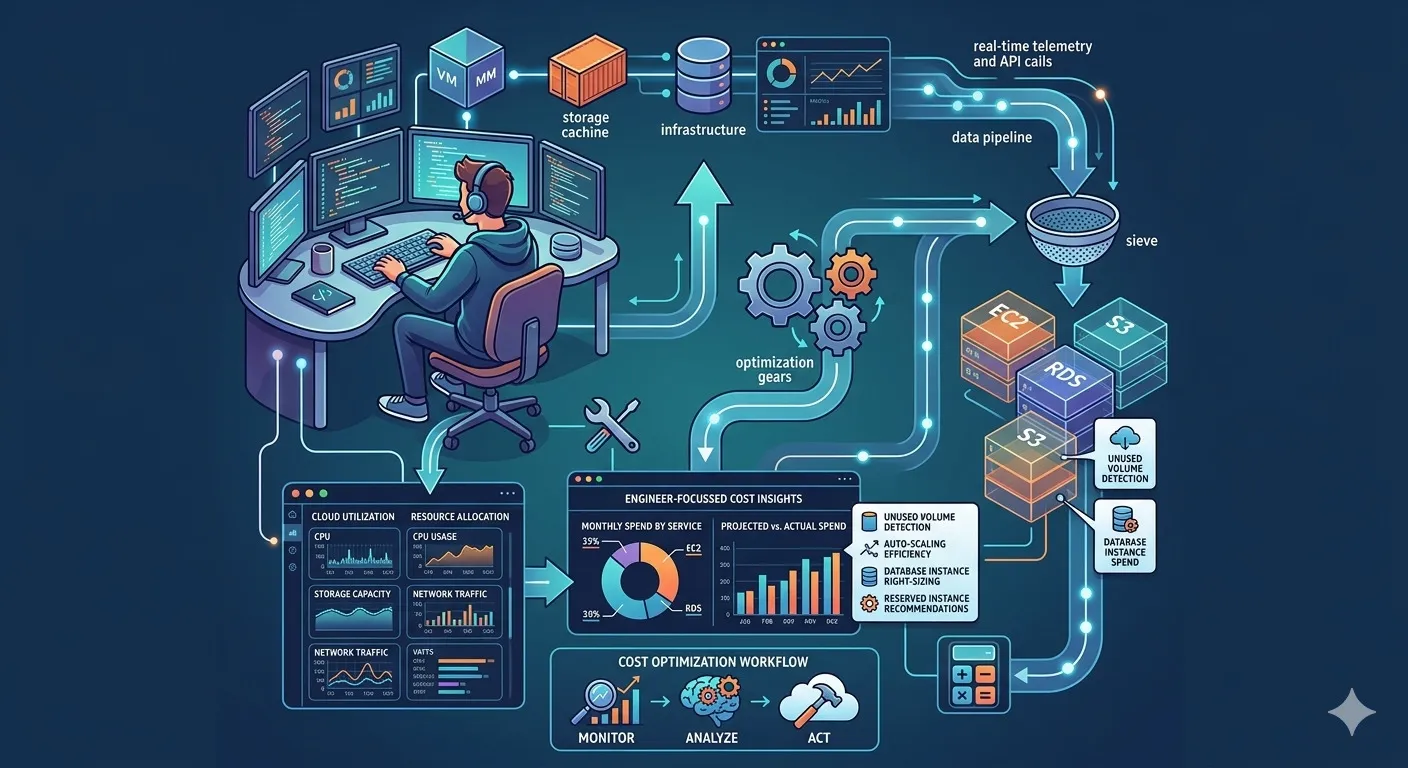
FinOps Basics for Engineers: Understand Cloud Costs from Technical Perspective
Table of Contents
- What is FinOps and Why Do Engineers Need to Know?
- Cloud Cost Psychology: Why Engineers Often “Forget” About Costs?
- FinOps Framework for Engineers
- Essential Cloud Cost Metrics to Monitor
- Technical Cost Optimization Strategies
- FinOps Tools and Platforms
- Implementing FinOps in Engineering Teams
- Case Study: Real-World Cost Optimization
- Practical FinOps Checklist
What is FinOps and Why Do Engineers Need to Know?
FinOps (Financial Operations) is the practice of managing cloud costs with a data-driven approach, combining finance, engineering, and business. For engineers, this isn’t about becoming finance experts—it’s about making smarter technical decisions from a cost perspective.
Why is FinOps Important for Engineers?
Modern Cloud Reality:
- Cost is no longer just a finance issue - Every technical decision directly impacts the bill
- Complexity pricing models - Pay-as-you-go, reserved instances, spot pricing, etc.
- Hidden costs - Data transfer, API calls, storage often overlooked
- Accountability increasing - Engineers asked to explain ROI of architecture decisions
Mindset Shift: From “Build it first, worry about cost later” to “Consider cost from day one”.
Cloud Cost Psychology: Why Engineers Often “Forget” About Costs?
Common Mental Blocks
1. “This is Finance’s Job”
- Engineers treat costs as finance team responsibility
- Result: No cost consideration during system design
2. “Cost is a Big Problem”
- Treating cost optimization as a large project requiring significant time
- Result: Delaying simple optimization actions
3. “Cloud is Expensive, That’s Just How It Is”
- Passive mindset accepting high costs as normal
- Result: No effort to find more efficient alternatives
4. “It’s Too Complicated to Calculate”
- Complex pricing models make engineers give up
- Result: No cost estimation at all
How to Change Mindset
Start Small, Think Impact:
micro_decisions:
  - Choose smaller instance for development
  - Use spot instances for non-critical workloads
  - Implement auto-scaling instead of over-provisioning
  - Clean up unused resources weekly

big_impacts:
  - Database size affects storage AND compute costs
  - API design influences data transfer costs
  - Architecture decisions impact monthly baseline costs
FinOps Framework for Engineers
This framework is designed specifically for engineers with focus on technical implementation:
FinOps Framework for Engineers:
├── Layer 1: Awareness (Real-time)
│   ├── Cost visibility dashboards
│   ├── Budget alerts
│   ├── Resource tagging
│   └── Cost allocation
├── Layer 2: Optimization (Proactive)
│   ├── Right-sizing recommendations
│   ├── Architecture patterns
│   ├── Scheduled cleanup
│   └── Performance vs cost tradeoffs
└── Layer 3: Governance (Strategic)
    ├── Cost policies
    ├── Approval workflows
    ├── Forecasting
    └── Continuous improvement
FINOPS Framework Principles
F - Forecast: Predict costs before implementation I - Inform: Make costs visible and understandable N - Normalize: Standardize cost-conscious practices O - Optimize: Continuously seek efficiency opportunities P - Perform: Monitor and measure optimization impact S - Sustain: Make practices sustainable
Essential Cloud Cost Metrics to Monitor
1. Core Cost Metrics
Daily Metrics:
# AWS CLI Example - Get daily costs
aws ce get-cost-and-usage \
  --time-period Start \
  --start-date $(date -d '30 days ago' +%Y-%m-%d) \
  --granularity DAILY \
  --group-by Type,SERVICE
Key Metrics to Track:
- Total Daily Spend - Daily cost trend
- Cost per Service - Breakdown by service (EC2, RDS, S3, etc.)
- Cost per Environment - Dev, staging, production breakdown
- Cost per Project/Team - Cost allocation per team
2. Efficiency Metrics
Resource Utilization:
# Example: CloudWatch metrics to track
efficiency_metrics:
  cpu_utilization:
    threshold: 40% # Low utilization indicates over-provisioning
    action: "Consider right-sizing"

  memory_utilization:
    threshold: 60%
    action: "Review memory requirements"

  storage_utilization:
    threshold: 70%
    action: "Implement lifecycle policies"
Cost Efficiency Ratios:
- Cost per User - Total cost ÷ number of active users
- Cost per Transaction - Total cost ÷ number of API calls
- Cost per GB Data - Total cost ÷ data processed
- Idle Resource Percentage - Resources without load ÷ total resources
3. Budget and Alert Metrics
Budget Tracking:
{
  "monthly_budget": 5000,
  "current_spend": 3247,
  "projected_spend": 4100,
  "budget_remaining": 1753,
  "days_remaining": 8,
  "daily_burn_rate": 408
}
Alert Thresholds:
- 80% budget warning - Alert when reaching 80% of budget
- 90% budget critical - Alert when approaching 90% of budget
- Anomaly detection - Unusual cost spikes
- Unused resource alerts - Resources without activity > 7 days
Technical Cost Optimization Strategies
1. Right-Sizing Strategy
Compute Optimization:
# Instance sizing decision matrix
workload_analysis:
  cpu_intensive:
    current: "t3.large"
    recommended: "c5.large"
    savings: "30%"
    action: "Monitor CPU metrics for 2 weeks"

  memory_intensive:
    current: "t3.large"
    recommended: "r5.large"
    savings: "25%"
    action: "Check memory usage patterns"

  burst_workloads:
    current: "t3.large (24/7)"
    recommended: "t3.large + spot instances"
    savings: "60%"
    action: "Implement spot instance fallback"
Database Optimization:
-- Identify over-provisioned databases
SELECT
  instance_id,
  cpu_utilization_avg,
  memory_utilization_avg,
  storage_utilization_avg,
  recommended_instance_class
FROM cloudwatch_metrics
WHERE
  cpu_utilization_avg < 40
  AND memory_utilization_avg < 60
ORDER BY (cpu_utilization_avg + memory_utilization_avg) ASC;
2. Storage Optimization
Data Lifecycle Management:
# S3 lifecycle policy example
lifecycle_rules:
  - id: "transition_to_ia"
    status: "Enabled"
    filter:
      prefix: "logs/"
    transitions:
      - days: 30
        storage_class: "STANDARD_IA"
      - days: 90
        storage_class: "GLACIER"

  - id: "delete_old"
    status: "Enabled"
    filter:
      prefix: "temp/"
    expiration:
      days: 7
Compression and Deduplication:
- Enable compression for static assets
- Use CDN to reduce data transfer
- Implement caching to reduce API calls
- Clean up duplicates in storage
3. Network Optimization
Data Transfer Costs:
# Network cost optimization checklist
network_optimization:
  data_transfer:
    - use_vpc_endpoints: "Reduce internet data transfer"
    - enable_compression: "Reduce payload size"
    - implement_caching: "Reduce repeated requests"

  cdn_usage:
    - cache_static_assets: "80% reduction in transfer"
    - edge_locations: "Improve user experience"
    - cost_analysis: "CDN vs direct transfer"
API Design for Cost:
// Cost-efficient API design
const costOptimizedAPI = {
  // Implement pagination instead of large responses
  getUsers: async (page = 1, limit = 50) => {
    return await db.users.findMany({
      skip: (page - 1) * limit,
      take: limit,
      select: ['id', 'name', 'email'] // Only select needed fields
    });
  },

  // Use webhooks for real-time updates
  subscribeToUpdates: (webhookUrl) => {
    return await webhookManager.create(webhookUrl);
  },

  // Implement efficient caching
  getCachedData: async (key) => {
    const cached = await redis.get(key);
    if (cached) return cached;

    const data = await fetchData(key);
    await redis.setex(key, 3600, data); // 1 hour cache
    return data;
  }
};
FinOps Tools and Platforms
1. Native Cloud Tools
AWS Cost Management:
# Setup cost allocation tags
aws ce create-cost-allocation-tag \
  --tag-key "Project" \
  --status "Active"

# Create budget
aws budgets create-budget \
  --account-id 123456789012 \
  --budget '{"BudgetName":"DevTeamBudget","BudgetType":"COST","TimeUnit":"MONTHLY","BudgetLimit":1000}'
Azure Cost Management:
# Get cost analysis
Get-AzConsumptionUsageDetail `
  -StartDate (Get-Date).AddDays(-30) `
  -EndDate (Get-Date) `
  -Granularity "Daily"
2. Third-Party FinOps Platforms
Cloudability (Recommended for mid-size teams):
- Pro: Comprehensive cost analysis, anomaly detection
- Con: Additional cost for the tool itself
CloudHealth (Enterprise features):
- Pro: Multi-cloud support, governance features
- Con: Complex setup, higher learning curve
Infracost (Infrastructure as Code):
# Install infracost
npm install -g infracost

# Generate cost estimate
infracost breakdown --path ./terraform/
Example Terraform with cost annotations:
resource "aws_instance" "web_server" {
  ami           = "ami-12345678"
  instance_type = "t3.medium"

  tags = {
    Name        = "Web Server"
    Environment = "production"
    CostCenter  = "engineering"
  }

  # Infracost cost estimation
  metadata {
    infracost = {
      components = {
        instance_type = "t3.medium"
        operating_system = "linux"
        utilization = 0.8
      }
    }
  }
}
3. Open Source Solutions
OpenCost (Kubernetes cost monitoring):
# OpenCost deployment
apiVersion: v1
kind: Namespace
metadata:
  name: opencost
  labels:
    name: opencost
---
apiVersion: apps/v1
kind: Deployment
metadata:
  name: opencost
spec:
  replicas: 1
  selector:
    matchLabels:
      app: opencost
Implementing FinOps in Engineering Teams
Phase 1: Setup Foundation (Week 1-2)
Technical Setup:
# 1. Enable cost monitoring APIs
aws ce enable-aws-organizations-access

# 2. Create cost allocation tags
aws ce create-cost-allocation-tag --tag-key "Team"
aws ce create-cost-allocation-tag --tag-key "Project"
aws ce create-cost-allocation-tag --tag-key "Environment"

# 3. Setup budgets and alerts
aws budgets create-budget \
  --budget file://budgets/dev-team.json \
  --notifications-with-subscribers file://alerts/slack.json
Tagging Strategy:
mandatory_tags:
  - Team: "frontend|backend|data|devops"
  - Project: "user-service|payment-api|analytics"
  - Environment: "dev|staging|production"
  - Owner: "[email protected]"

automated_tagging:
  - CreatedBy: "terraform|manual|ci-cd"
  - CostCenter: "engineering|product|operations"
Phase 2: Build Cost Awareness (Week 3-4)
Dashboard Creation:
// Example: Grafana dashboard for cost monitoring
const costDashboard = {
  panels: [
    {
      title: "Daily Spend Trend",
      type: "graph",
      targets: [
        {
          expr: "aws_ce_daily_spend",
          legendFormat: "{{Service}}"
        }
      ]
    },
    {
      title: "Cost by Team",
      type: "piechart",
      targets: [
        {
          expr: "aws_ce_spend_by_team",
          legendFormat: "{{Team}}"
        }
      ]
    }
  ]
};
Training Materials:
# FinOps Training for Engineers

## Module 1: Cost Awareness
- How to read cloud billing
- Understanding pricing models
- Common cost pitfalls

## Module 2: Cost-Effective Design Patterns
- Right-sizing strategies
- Storage optimization
- Network cost considerations

## Module 3: Tools and Automation
- Cost monitoring dashboards
- Automated cleanup scripts
- Budget alerts setup
Phase 3: Implement Optimization (Week 5-8)
Optimization Sprints:
sprint_1: "Right-sizing Week"
  goals:
    - Identify over-provisioned instances
    - Implement auto-scaling
    - Update instance families

  success_metrics:
    - "15% reduction in compute costs"
    - "No performance degradation"
    - "All changes documented"

sprint_2: "Storage Optimization"
  goals:
    - Implement lifecycle policies
    - Clean up unused EBS volumes
    - Optimize S3 storage classes

  success_metrics:
    - "20% reduction in storage costs"
    - "Automated cleanup policies"
    - "Data retention compliance"
Case Study: Real-World Cost Optimization
Case Study 1: E-commerce Platform
Background:
- Platform: AWS with 50+ microservices
- Monthly cost: $12,000
- Team: 15 engineers
- Problem: Costs continuously rising without clear cause
Analysis Findings:
cost_breakdown:
  compute: 45% ($5,400)
  database: 25% ($3,000)
  storage: 15% ($1,800)
  network: 10% ($1,200)
  other: 5% ($600)

issues_found:
  - "70% of databases over-provisioned"
  - "40% of storage in expensive tier"
  - "No auto-scaling in production"
  - "Missing cost allocation tags"
Optimization Actions:
- Database Right-sizing - Downgrade 8 of 12 database instances
- Storage Class Migration - Move 60% of data to Glacier
- Auto-scaling Implementation - For 15 main microservices
- Scheduled Cleanup - Automated cleanup for temporary resources
Results After 3 Months:
- Cost reduction: 32% ($8,160/month)
- Performance impact: Minimal (2% slower peak response time)
- Team productivity: +25% (less time spent on cost issues)
- ROI: 400% in 6 months
Case Study 2: SaaS Startup
Background:
- Platform: Multi-cloud (AWS + GCP)
- Monthly cost: $8,500
- Team: 8 engineers
- Problem: No cost visibility per feature
FinOps Implementation:
implementation_steps:
  1. "Deploy OpenCost for Kubernetes monitoring"
  2. "Implement cost allocation by feature"
  3. "Create budget alerts per team"
  4. "Weekly cost review meetings"
  5. "Automated resource cleanup"
Key Learnings:
- Feature-based costing helps development prioritization
- Multi-cloud complexity requires standardized tools
- Engineering ownership increases accountability
- Small changes can provide big impact
Practical FinOps Checklist
Before Implementing New Features
- Estimate additional costs (compute, storage, network)
- Review more efficient architecture alternatives
- Consider long-term cost impact
- Setup monitoring for new resources
- Determine tagging strategy
- Create budget review milestones
During System Architecture Design
- Analyze cost vs performance tradeoffs
- Choose appropriate instance type for workload
- Implement auto-scaling from the start
- Design for efficient data transfer
- Consider multi-AZ vs multi-region costs
- Plan cleanup strategy for temporary resources
Monitoring and Maintenance
Daily:
- Check cost dashboards for anomalies
- Review budget alerts
- Monitor resource utilization
- Check unused resources
Weekly:
- Review cost trends per service
- Analyze efficiency metrics
- Update cost forecasts
- Review optimization opportunities
Monthly:
- Comprehensive cost review
- Update tagging strategy
- Review budget allocations
- Plan optimization initiatives
Review and Optimization
Quarterly:
- Deep dive cost patterns
- Evaluate new cloud services/features
- Review pricing model changes
- Update FinOps processes
- Share learnings with other teams
Emergency Response
Cost Spike Detection:
- Immediate investigation for cost spikes
- Root cause analysis (bug, misconfiguration, attack)
- Implement mitigation measures
- Document incident and prevention steps
- Review alert thresholds
Conclusion
FinOps isn’t about minimizing costs as much as possible—it’s about making smart technical decisions with proper cost consideration. Engineers who understand FinOps can:
- Design cost-efficient systems from the start
- Make informed tradeoffs between performance and cost
- Detect and resolve cost issues quickly
- Communicate business impact of technical decisions
Key Takeaways:
- Cost is a technical concern - Every architecture decision has financial impact
- Visibility is foundation - Can’t optimize what you can’t see
- Small changes, big impact - Simple optimizations can provide significant savings
- Automation is key - Manual processes don’t scale
- Collaboration matters - FinOps requires teamwork between engineering, finance, and product
Remember: Cloud provides incredible flexibility, but that flexibility comes with pricing complexity. FinOps helps you leverage that flexibility without losing cost control.
Related Articles
- Create Documentation That Developers Actually Read
- AI for Code Review: Playbook for Faster Reviews
- Incident Response for Small Teams: Staying Calm During Production Errors
What cost optimization strategy has been most effective for you? Share your FinOps tips and tricks in the comments, so we can all save on cloud costs! 💰⚡